Smart Reviews logo

How to Add Your Business to Google Maps: Step-by-Step Guide

Being listed on Google Maps is essential for increasing visibility and attracting local customers.

There are literally billions of local searches each day by people relying on Google Maps for directions and business information. If you want foot traffic, customer trust, and search engine rankings – you need to ensure your business is listed correctly.

In this guide, we’ll walk you through how to add your business to Google Maps—plus give you tips on maintaining your listing and troubleshooting common issues.

Why Google Maps is so important?

A Google Maps presence offers many advantages:

Benefit Description
Enhanced local SEO Google Maps listings appear prominently in search results, helping local customers find your business.
Improved accessibility Easy-to-find directions and contact information make it simple for customers to connect with you.
Increased credibility A well-maintained Google Maps listing with photos and reviews builds trust with potential customers.

Related reading: Want to know more about why local visibility matters? Check out our article: What Is Local SEO and How Does It Work?

Prerequisites: What You Need Before Adding Your Business

Before you get started, make sure you have the following:

  1. A Google account: You’ll need a Google account to manage your business profile via Google Business Profile (GBP).
  2. All your business information: gather essential details, such as:
  • Business name—official and consistent with other platforms
  • Address—accurate and formatted correctly
  • Phone number
  • Business category e.g. “Restaurant,” “Dentist”
  1. Visual content: high-quality photos of your business, logo, or storefront to make your listing more appealing.

Step-by-step Guide to Adding Your Business to Google Maps

Follow these steps to successfully list your business on Google Maps:

Step 1: Sign in to Google Business Profile (GBP)

  • Head here and log in with your Google Account.
  • If you don’t have an account, create one—it’s free and essential for managing your Google Maps presence.

Step 2: Find Your Business

  • Once logged in, search for your business name to check if it’s already listed.
  • If your business is listed but unmanaged, you can claim ownership.
Google search result for 'The Boutique' showing business profile setup and claim prompt for owners – Smart Reviews

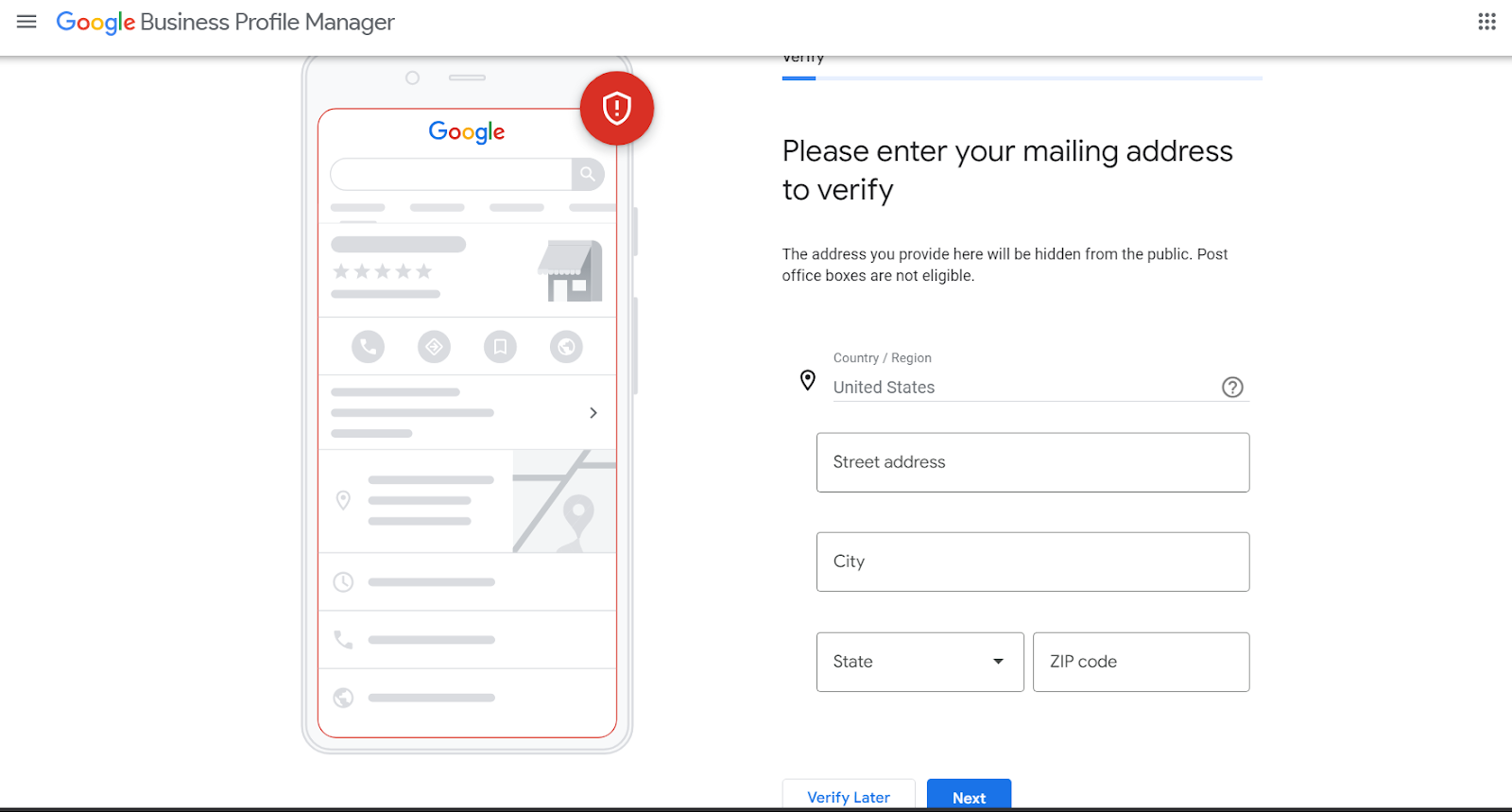
Step 3: Add a New Business

  • If your business doesn’t appear, click on “Add your business to Google.”
  • Fill out all the required fields, including your business name, category, and address.
Google Business Profile form prompting address entry to verify and add a new business listing – Smart Reviews

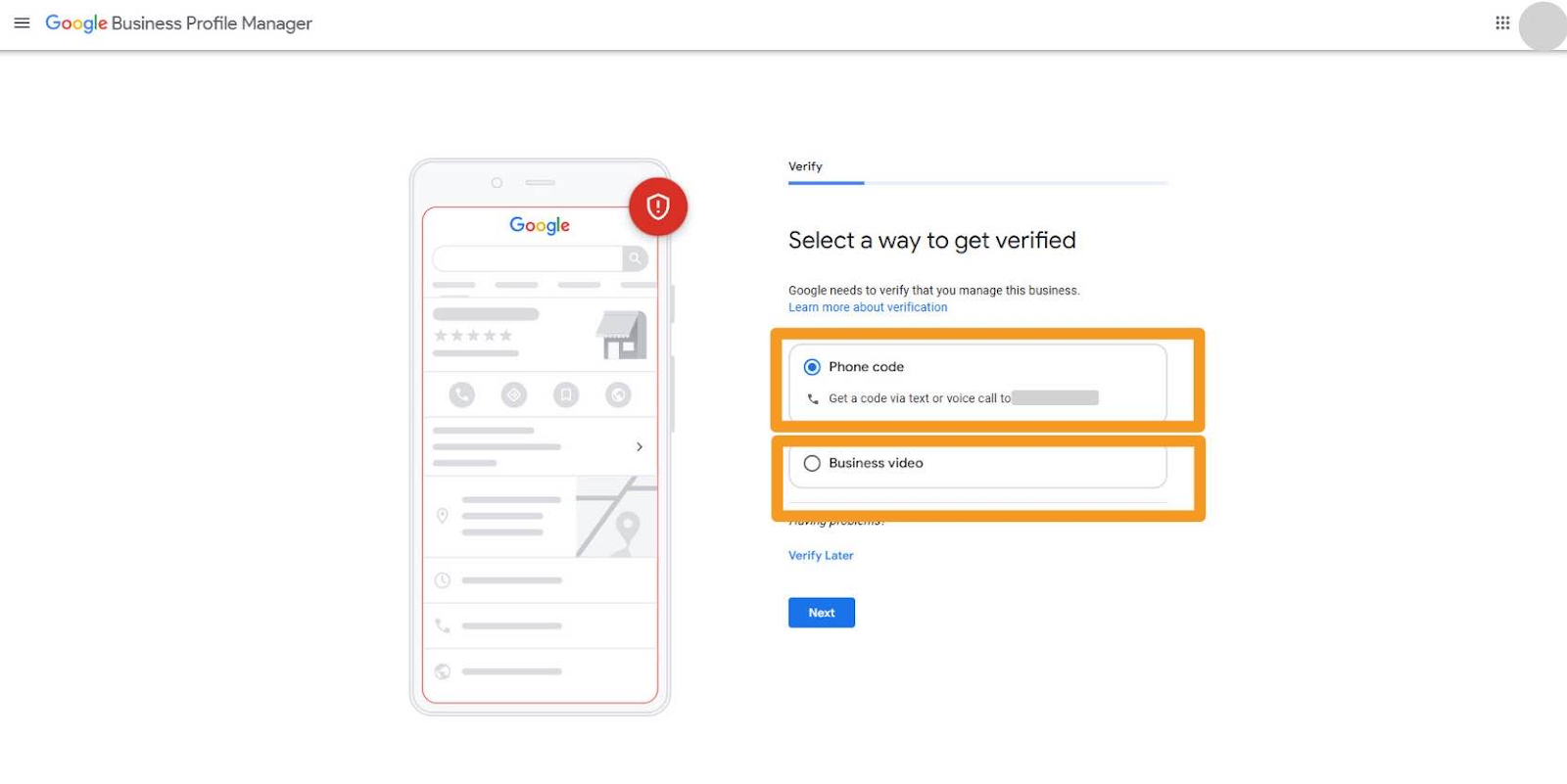
Step 4: Verify Your Business

Verification is a critical step to confirming you’re the legitimate owner of the business. Google offers multiple verification methods.

  • By postcard: Google mail a postcard with a verification code to your business address. This can take 5-10 days.
  • By phone or email: some businesses may qualify for phone or email verification for quicker approval.
Google Business Profile verification screen offering phone code and video options for business proof – Smart Reviews

Once you complete the verification process, your business will appear on Google Maps. Congratulations on boosting your online presence!

Step 5: Optimise Your Google Maps Listing

Once your business is verified, take these steps to optimise your profile:

  • Write a compelling description: include relevant natural keywords like ‘cafes in Sydney’ and describe your services or products clearly.
  • Add high-quality photos: showcase your storefront, team, or products to create a professional and welcoming impression.
  • Include accurate business hours: ensure customers know your availability, including holidays or special hours.
  • Enable reviews: encourage customers to leave reviews and respond to them promptly.

How to Manage Google Reviews Effectively

Once your business is listed, online reviews on your Google Maps profile play a key role in attracting customers.

Positive reviews build credibility and influence customer decisions, while negative reviews can harm your reputation if left unchecked.

Need help managing your reviews? Smart Reviews can help you stay on top of your Google reviews by streamlining the process of monitoring, responding, and engaging with customer feedback. With Smart Reviews, you can effortlessly maintain a positive brand image and build audience trust.

‍Tips for maintaining your Google Maps listing

Setting up your Google Maps listing is only the first step—regular maintenance ensures it stays accurate and useful for customers. Follow these tips:

  • Update information regularly: keep details like hours, phone number, and services up-to-date.
  • Engage with reviews: respond to positive and negative reviews to build trust and show you care about customer feedback.
  • Monitor insights: use the GBP ‘Performance’ feature to track customer interactions, like clicks, calls, and direction requests, and adjust your strategy accordingly.
Smart Reviews Google Business dashboard showing profile tools, reviews, insights, and map view – Smart Reviews

How to Fix Common Issues

Here are some common issues you may encounter and how to resolve them:

  • Delayed verification: if your verification code hasn’t arrived, check the address for accuracy or request a new code.
  • Duplicate listings: avoid confusion by following Google’s guidance on how to report or merge duplicate entries, see how here.
  • Incorrect information: update errors immediately in GBP to ensure customers see accurate details.

If further assistance is needed, refer to Google’s support resources or contact their help centre.

Benefits of Listing Your Business on Google Maps

Listing your business on Google Maps significantly enhances your digital presence by:

  • Attracting more local customers searching for services near them.
  • Improving your business’s online reputation through verified reviews.
  • Offering valuable insights about customer behaviour through analytics provided by Google.

Adding your business to Google Maps is a simple yet powerful way to enhance your local visibility and grow your customer base.

Ensure your business stands out in local search results and maintain an optimised listing by following the steps outlined in this guide.

Don’t wait—take the first step to elevate your business today! Sign in to Google Business Profile and add your business to Google Maps now.

More articles

The (social) proof is in the pudding.

Have you heard the term ‘social proof’ but are unsure what it’s all about? We’ve got you covered! Social proof is the idea that consumers will adapt their behaviour based on what other people are doing. Nothing new there really? When we see a line of excited customers waiting to eat at a popular restaurant or a […]

Tips and tricks: responding to negative reviews

Top tips Customer reviews can be both a blessing and a curse. Great reviews provide social proof  and put potential customers at ease. On the flip side, not every review can be five stars, and negative customer reviews are almost impossible to avoid. Rather than take your frustration out on your keyboard, use unfavourable reviews as an […]

How to nail asking your customers for reviews

It can be daunting to ask your customers to leave a review, but the benefits far outweigh an awkward moment. Asking for reviews from customers is one of the most powerful customer acquisition and retention strategies you can have up your sleeve. That’s because online reviews can do wonders for your company. They help build […]

A positive spin on negative reviews

It can be daunting to receive a negative review but trust us, it’s not the end of the world! Maybe your team is just having an off day, or a reviewer is proving particularly hard to please? One negative review is unlikely to completely ruin your chances in local search though, so don’t worry too […]

Ready to Boost Your Business with More 5-Star Reviews?

Our review specialists are here to answer your questions, show you how it works, and help you get started – no pressure, just expert advice.
Smart Reviews
Turning Reviews into Results
Credit card

Copyright © 2025. Smart Reviews. All Rights Reserved. Website Design by Wolf IQ